

Download SimplyRAR – Fast, Secure RAR Archiver for macOS
Overview
SimplyRAR is a lightweight, GUI‑driven RAR archiver built specifically for macOS users who want the power of WinRAR without the command‑line hassle. While many Mac‑based RAR tools rely on terminal commands or lack an intuitive interface, SimplyRAR fills the gap by offering a clean drag‑and‑drop workflow, right‑click context menu integration, and instant log feedback after each operation. The application targets both casual users who need to unzip a single file and power users who regularly compress large folders for backup or distribution.
Despite its simple appearance, SimplyRAR supports the full RAR compression algorithm, allowing users to create .rar archives that are compatible with Windows, Linux, and other platforms. The tool also respects the original file timestamps, encryption options, and split‑archive capabilities when needed. However, it is important to note that the original developer appears to have discontinued active support, which may affect future updates or compatibility with newer macOS releases.
Even so, the existing version remains a viable, free alternative for everyday archiving tasks, especially for those who prefer a point‑and‑click experience over complex terminal commands.
Core Features & Installation Guide
- Graphical user interface optimized for macOS
- One‑click RAR creation and extraction
- Context‑menu integration for quick right‑click operations
- Support for multi‑volume (split) archives
- Optional AES‑256 encryption for secure archives
- Preserves original timestamps and file attributes
- Instant operation log displayed after each task
- Drag‑and‑drop functionality for batch processing
Step‑by‑Step Installation
Downloading and installing SimplyRAR is straightforward. Begin by visiting the official download page or a trusted software repository that hosts the macOS version. The installer is packaged as a standard .dmg file. Double‑click the file to mount the disk image, then drag the SimplyRAR icon into the /Applications folder. macOS may prompt you to confirm that you trust the application; click “Open” to proceed. After the copy completes, eject the disk image.
First‑Run Configuration
When you launch SimplyRAR for the first time, the app will request permission to access your files. Grant access to the folders you intend to compress or extract. The preferences pane (accessible via the menu bar) lets you customize default compression levels, set a default extraction path, and enable or disable the right‑click context menu. For users who need encrypted archives, simply tick the “Enable Encryption” box and provide a strong passphrase. All settings are saved automatically, so you can start archiving immediately after configuration.
Using the Application
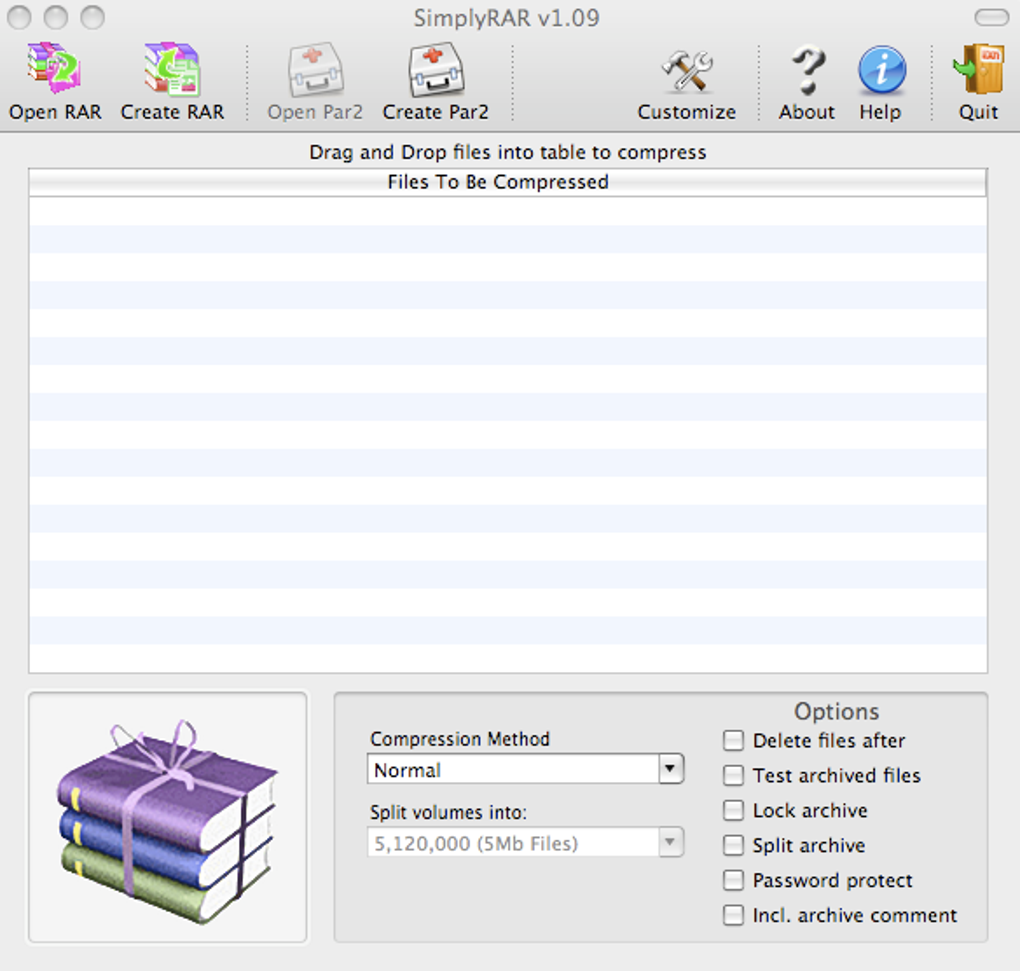
To create a RAR archive, select the files or folders you wish to compress, right‑click, and choose “Compress with SimplyRAR.” The app will open a small window where you can adjust the compression level (Fast, Normal, Maximum) and decide whether to split the archive into smaller volumes. Once you click “Compress,” SimplyRAR processes the files and displays a concise log indicating success or any errors encountered. Extraction follows a similar workflow: right‑click a .rar file and select “Extract with SimplyRAR,” then choose the destination folder. The log will confirm the number of files extracted and the total time taken.
Compatibility, Pros & Cons
SimplyRAR runs on macOS 10.12 Sierra and later, including the latest macOS Ventura. The app is a native 64‑bit application, which means it takes full advantage of modern hardware acceleration for faster compression and extraction. While the software does not have an official Windows or Linux version, the archives it creates are fully compatible with those operating systems, allowing seamless file exchange across platforms.
Pros
- Intuitive graphical interface makes archiving accessible for beginners.
- Quick right‑click integration saves time for frequent users.
- Supports advanced features like multi‑volume archives and AES‑256 encryption.
- Lightweight footprint; does not consume excessive disk space.
- Free to download and use without hidden fees.
Cons
- Developer support appears discontinued, raising concerns about future updates.
- Some users report higher RAM usage during large batch compressions.
- No built‑in update mechanism; users must manually download newer releases.
- Lacks a built‑in file manager; relies on macOS Finder for navigation.
- Limited documentation; troubleshooting may require community forums.
Frequently Asked Questions
Is SimplyRAR compatible with the latest macOS Ventura?
Yes, SimplyRAR runs on macOS 10.12 Sierra and later, which includes Ventura. However, because the developer no longer provides updates, users should test the app after a major OS upgrade to ensure full functionality.
Can I encrypt my RAR archives with SimplyRAR?
Absolutely. SimplyRAR offers AES‑256 encryption. Activate it in the preferences pane or during the compression dialog, then enter a strong passphrase. The encrypted archive can be opened on any platform that supports RAR encryption.
Why does SimplyRAR use a lot of RAM during large compressions?
The application loads entire files into memory to achieve higher compression ratios, which can increase RAM consumption for very large or numerous files. If RAM usage becomes a concern, consider compressing smaller batches or using the “Fast” compression level.
Is there a way to update SimplyRAR automatically?
No built‑in updater exists. Users must manually check the official download page or trusted repositories for newer releases and reinstall the updated version.
Can I extract non‑RAR formats like ZIP or 7z with SimplyRAR?
SimplyRAR focuses on RAR creation and extraction. For other archive types, you’ll need a complementary tool such as The Unarchiver or 7zX. However, SimplyRAR can extract .zip files if the underlying macOS libraries support it.
Conclusion & Call to Action
SimplyRAR stands out as one of the most user‑friendly RAR archivers available for macOS. Its point‑and‑click design, right‑click integration, and support for encryption make it an attractive choice for both beginners and seasoned professionals who need a reliable way to compress and share files across platforms. While the absence of active developer support and occasional memory spikes are valid concerns, the core functionality remains solid and free of cost. If you’re looking for a straightforward tool to handle RAR archives without diving into terminal commands, SimplyRAR delivers exactly that. Download SimplyRAR today to streamline your file compression workflow and enjoy a hassle‑free archiving experience on your Mac.







